DATA FROG X3 Wireless Mobile Gaming Controller – Hall Effect Precision for Android
DATA FROG X3 Wireless Mobile Gaming Controller – Hall Effect Precision for Android
Couldn't load pickup availability
Mobile gaming performance suffers dramatically when forced onto touchscreen controls—imprecise virtual buttons, obscured screen real estate, and clumsy multi-touch gestures creating competitive disadvantages against players using proper physical controls. The DATA FROG X3 Wireless Controller transforms Android mobile gaming through telescopic phone mount, Hall effect contactless technology eliminating stick drift, integrated cooling preventing thermal throttling, and tri-platform compatibility (Android/Switch/PC) delivering console-quality control precision to competitive mobile titles like PUBG Mobile, Call of Duty Mobile, and FIFA Mobile where touchscreen controls simply cannot compete.
Why This Controller Elevates Mobile Gaming
Hall Effect Technology: Drift-Free Precision for Competitive Gaming
The Hall effect magnetic sensor implementation in both joysticks and triggers eliminates the stick drift plague afflicting traditional potentiometer-based mobile controllers through contactless position detection. Whilst touchscreen overlays suffer from imprecise finger placement and traditional controllers develop drift from potentiometer wear, the X3's Hall sensors maintain perfect calibration indefinitely—delivering the consistent aim precision competitive mobile gaming demands.
The linear Hall triggers provide pressure-sensitive analog input allowing gradual throttle control in racing games, variable fire rates in shooters, and nuanced character movement impossible with binary digital triggers or touchscreen controls. Reviews confirm the "accurate directional control and smooth input responsiveness" proving particularly valuable in twitch-reflex competitive scenarios where millisecond advantages determine victory.

Integrated Cooling Fan: Preventing Thermal Throttling During Marathon Sessions
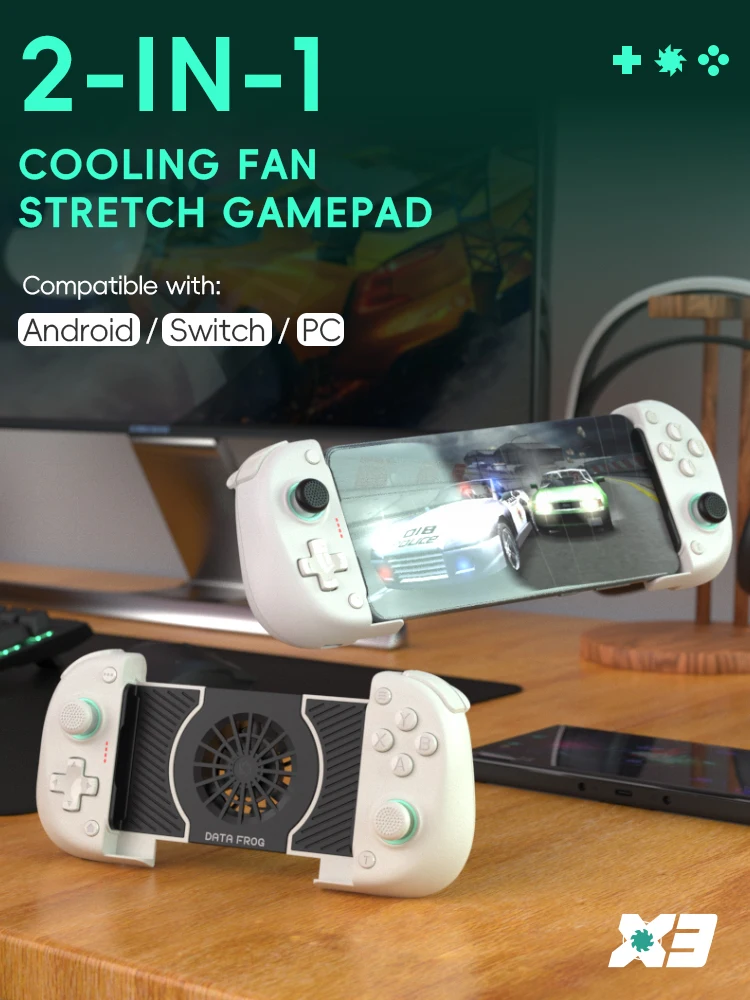
The built-in cooling fan addresses mobile gaming's critical weakness—prolonged intensive gaming causing device overheating, triggering thermal throttling that reduces frame rates precisely when competitive performance matters most. The active cooling maintains optimal device temperature during extended sessions, preventing the performance degradation and uncomfortable device heat that plague unsupported mobile gaming.

Critical Implementation Note: The cooling fan requires separate USB power connection (to power bank, wall adapter, or device USB-C port if supporting power output) functioning independently from controller battery. This design prevents controller battery drain whilst providing adjustable cooling deployment—activate during intensive sessions, disable for casual gaming maximising portability.
Adjustable Telescopic Mount: Universal Phone Compatibility
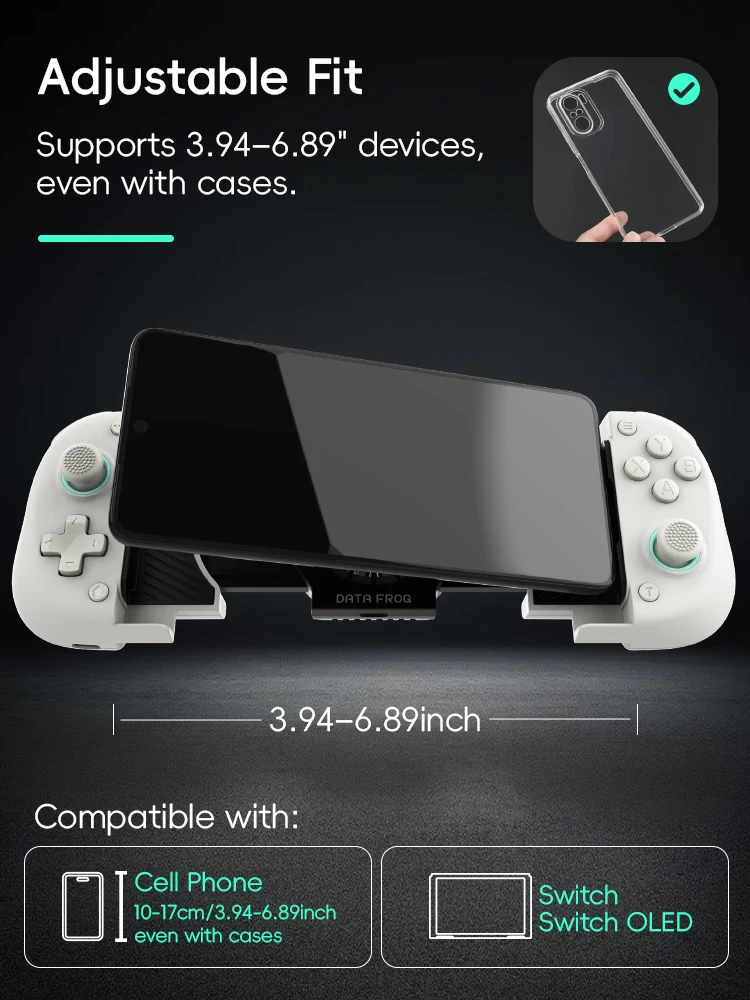
The stretchable mounting system accommodates devices ranging 100-175mm (3.94-6.89 inches) including phones with protective cases—covering virtually all modern Android smartphones from compact models (Samsung Galaxy A05, Redmi 13C) through flagship phablets (Samsung Galaxy S24 Ultra). The secure clamping mechanism prevents device shifting during intensive gameplay whilst cushioned contact points protect screen and chassis from pressure damage.
The symmetric expansion design maintains balanced weight distribution preventing the top-heavy tipping that plagues asymmetric mobile controller mounts, enabling comfortable extended play without arm fatigue or awkward grip compensation.
Tri-Platform Compatibility: Android Primary, Switch/PC Secondary
Whilst optimised specifically for Android 6.3+ devices through dedicated companion app and HID protocol support, the X3 additionally supports Nintendo Switch and Windows PC gaming via Bluetooth 5.2 connectivity:
- Android (Primary): Full feature support including app-based button mapping for non-HID games (PUBG Mobile, Call of Duty Mobile), native HID support for compatible titles, and customisable control schemes
- Nintendo Switch: Standard controller functionality (lacks gyroscope for motion controls), screenshot/recording features, turbo function support
- Windows PC (7+): Bluetooth or wired USB connectivity for controller-compatible PC games

Important iOS Limitation: Not compatible with iPhone or iPad—Apple's restrictive controller policies prevent third-party mobile controller support outside official MFi certification which budget controllers cannot economically obtain.
Motor Vibration Feedback for Immersive Gaming
The integrated rumble motors provide haptic feedback translating in-game actions (gunfire, collisions, explosions) into tactile sensations enhancing immersion beyond visual/audio feedback alone. The vibration implementation proves particularly effective in racing games (feeling road surface and collisions) and shooters (weapon recoil feedback) adding dimension impossible through touchscreen gaming.
Turbo Function: Rapid-Fire Advantage for Competitive Gaming
The programmable turbo mode allows assigning rapid-fire capability to face buttons (A/B/X/Y) and triggers (LB/LT/RB/RT), automating button mashing scenarios in fighting games, enabling sustained fire in shooters without finger fatigue, and providing competitive advantage in titles rewarding rapid input. Configure turbo rates matching specific game requirements through simple button combinations.
20+ Hour Battery Life for Uninterrupted Gaming
The 370mAh lithium battery provides 20+ hours continuous play from full charge, ensuring multiple gaming sessions between recharges. The extended battery life accommodates daily gaming routines without mid-session charging anxiety, whilst 60-day standby retention means the controller remains ready for spontaneous gaming weeks after last use.
Technical Specifications with Appeal
Controller Technology:
- Joystick Type: Hall effect magnetic sensors (contactless, drift-free precision)
- Trigger Type: Hall effect linear analog triggers (pressure-sensitive gradual control)
- Vibration: Dual asymmetric motors providing haptic feedback
- Turbo Function: Programmable rapid-fire on A/B/X/Y/LB/LT/RB/RT buttons
Connectivity & Compatibility:
- Wireless Protocol: Bluetooth 5.2 (EDR/BLE) providing 8m transmission range
- Wired Option: USB-C connection for zero-latency gaming and simultaneous charging
-
Compatible Platforms:
- Android 6.3+ (primary optimisation with full app support)
- HarmonyOS (Huawei/Honor devices)
- Nintendo Switch/Switch OLED/Switch Lite
- Windows 7/8/10/11 PC (Bluetooth or wired)
- iOS Compatibility: Not supported (iPhone/iPad incompatible)
Device Mounting:
- Adjustable Range: 100-175mm (3.94-6.89 inches)
- Phone Compatibility: Fits devices with protective cases installed
-
Supported Models (Examples):
- Samsung Galaxy S24 Ultra, S24, A15, A05
- Redmi 13C and similar Xiaomi devices
- Most Android phones within size range
Cooling System:
- Type: Integrated electric fan
- Power Source: Separate USB connection required (not controller battery)
- Function: Prevents device thermal throttling during extended gaming
Power Specifications:
- Battery Capacity: 370mAh rechargeable lithium battery
- Battery Life: 20+ hours continuous gaming
- Standby Duration: 60 days fully charged
- Charging: USB-C connection, 5V/500mA input
- Working Voltage: DC 3.7V
- Working Current: Approximately 10mA
Physical Specifications:
- Dimensions: 183.9 × 86.6 × 46.8mm (controller without phone)
- Weight: 256g (controller only, phone adds additional weight)
- Button Layout: Standard gamepad configuration (D-pad, 4 face buttons, analog sticks, shoulder buttons/triggers)
- Build Material: Durable plastic construction
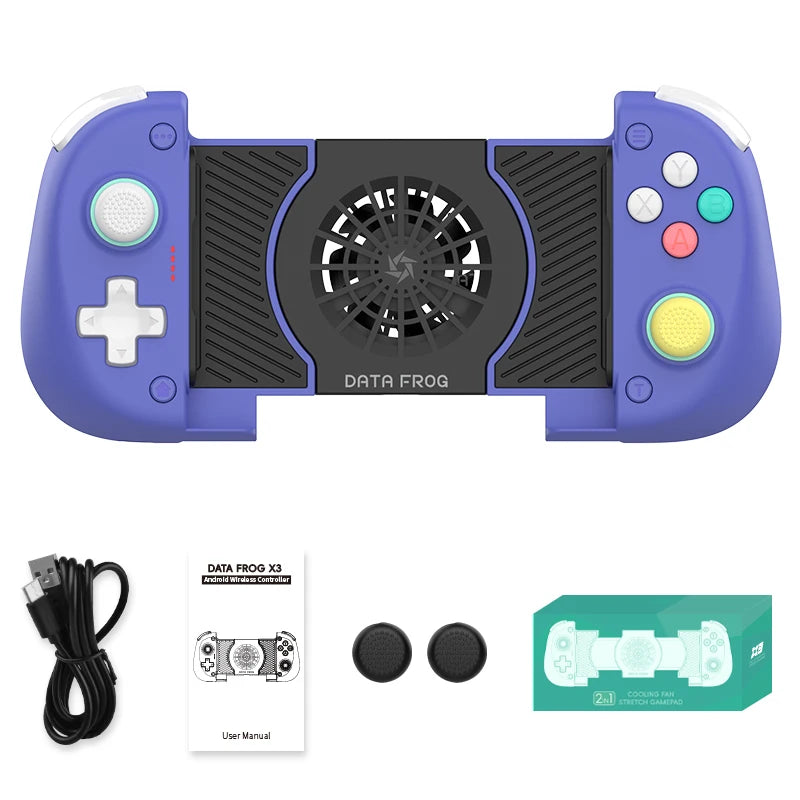
Package Contents:
- 1 × DATA FROG X3 Wireless Controller
- 1 × USB-C charging cable
- 1 × User manual with illustrated setup guide
- Note: Cooling fan USB power cable typically included (verify with seller)
Objection Elimination
Android Compatibility Verification: The controller optimises for Android 6.3+ but certain devices—particularly older models with specific MediaTek (MT Series) processors—may experience compatibility issues. The comprehensive user manual includes detailed incompatibility list allowing verification before purchase. For maximum compatibility assurance, verify your specific device model against manufacturer compatibility documentation.
iOS Users Seeking Alternatives: iPhone and iPad users cannot use this controller due to Apple's restrictive MFi certification requirements. iOS-compatible alternatives include Backbone One, Razer Kishi V2, or GameSir X2 Lightning—these certified controllers command premium pricing reflecting Apple certification costs, explaining why budget controllers focus exclusively on open-platform Android compatibility.
Cooling Fan Practicality: The separate cooling fan power requirement (additional USB connection) may seem inconvenient compared to integrated solutions, but provides significant advantages: prevents controller battery drain during cooling operation, allows selective deployment (intensive games) vs battery conservation (casual gaming), and delivers more powerful cooling unrestricted by controller battery capacity limitations.
Switch Gyroscope Limitation: The X3 lacks built-in gyroscope sensors, preventing motion control functionality in Switch games requiring gyro aiming (Splatoon 3, Breath of the Wild bow aiming). This represents conscious cost-saving measure—gyroscopes add significant manufacturing expense whilst benefiting limited game subset. Users prioritising Switch gyro support should consider premium alternatives including gyro sensors.
Setup Complexity Concerns: Mobile controllers require more initial configuration than traditional controllers—downloading companion apps for non-HID games, configuring button mappings, understanding dual connection modes (HID vs app-based). However, the included comprehensive illustrated and video manual guides users through setup systematically. Second-time connections remember previous configurations, eliminating repeated setup procedures.
Who Will Love This Controller?
Competitive Mobile Gamers Seeking Control Advantage
You play competitive mobile titles (PUBG Mobile, Call of Duty Mobile, FIFA Mobile) where touchscreen controls create disadvantage against controller-using opponents. The Hall effect precision, analog triggers, and physical button tactility provide the competitive control edge transforming mobile gaming from handicapped touchscreen struggle into legitimate competitive platform rivalling console experiences.
Android Gamers Frustrated by Touchscreen Limitations
You enjoy mobile gaming but despise touchscreen controls obscuring screen visibility, lacking tactile feedback, and preventing the control precision you've developed through years of console/PC gaming. The X3 transforms Android gaming from compromised touchscreen experience into proper controller-based gaming matching console familiarity and control quality.
Commuters and Travellers Gaming On-the-Go
Your daily routine includes extended public transport commutes or frequent travel offering gaming opportunities, but traditional handheld consoles (Switch, Steam Deck) prove too bulky whilst phones lacking controllers feel inadequate. The X3 transforms phones into legitimate portable gaming systems—compact when collapsed, extensive battery life, comprehensive game compatibility—rivalling dedicated handhelds at fraction of bulk and cost.
Multi-Platform Gamers Seeking Versatile Controller
You game across Android mobile, Nintendo Switch, and PC but refuse purchasing separate controllers for each platform. The tri-platform compatibility enables single controller serving multiple gaming scenarios—mobile gaming during commutes, Switch gaming at home, PC gaming at desk—maximising controller investment through universal deployment.
Budget-Conscious Gamers Avoiding Premium Controller Pricing
You want mobile gaming controller functionality without premium controller expenditure on certified MFi alternatives or high-end mobile controllers. The X3 delivers essential features—Hall effect technology, cooling, turbo, vibration—at accessible pricing prioritising functional performance over premium materials or brand recognition.
Parents Seeking Child-Appropriate Mobile Gaming Control
You've provided children with smartphones for communication but want healthier mobile gaming alternatives to touchscreen addiction encouraging better posture, reducing eye strain from close-distance touchscreen squinting, and providing familiar controller paradigm matching console gaming they already understand.
Gaming Enthusiasts Expanding Mobile Gaming Seriously
You've traditionally dismissed mobile gaming as inferior touchscreen experience but recent AAA mobile ports (Genshin Impact, Honkai: Star Rail, console-to-mobile conversions) prove mobile platforms can deliver legitimate gaming experiences when proper controllers eliminate touchscreen handicaps. The X3 enables taking mobile gaming seriously as legitimate platform rather than casual touchscreen distraction.
Final Call to Action
Transform your Android mobile gaming from touchscreen compromise into competitive console-quality experience. Add to basket now and discover why physical controls, Hall effect precision, and active cooling elevate mobile titles from casual distraction into legitimate gaming platform rivalling dedicated consoles. Whether dominating PUBG Mobile leaderboards, enjoying FIFA Mobile with proper analog control, or simply preferring physical buttons over touchscreen obscuration, you'll appreciate mobile controller delivering proper gaming input without premium pricing.
What's Included
- 1 × DATA FROG X3 Wireless Controller with telescopic phone mount
- 1 × USB-C charging cable
- 1 × USB power cable (for cooling fan—verify inclusion with seller)
- 1 × Comprehensive user manual (illustrated setup guide + video tutorials)
Note: Smartphone, games, and power bank not included. Verify Android device compatibility before purchase—iOS devices incompatible.
Setup and Optimisation Guide
Initial Android Connection (HID Mode Games):
For games supporting standard controller input (Minecraft, emulators, many premium titles):
- Fully charge controller before first use (2-3 hours via USB-C)
- Power on controller (hold power button 3 seconds until LED illuminates)
- Enable Bluetooth on Android device
- Search Bluetooth devices, select "DATA FROG X3"
- Confirm pairing when prompted
- Launch compatible game—controller recognised automatically
- Configure in-game control settings if customisation desired
Android Connection (Non-HID Mode Games):
For games requiring app-based mapping (PUBG Mobile, Call of Duty Mobile, many competitive titles):
- Download companion app (link provided in manual or product page)
- Grant necessary permissions (accessibility, overlay) for app functionality
- Connect controller via Bluetooth using HID mode instructions above
- Launch companion app before starting game
- App displays floating control configuration overlay
- Match virtual buttons to controller inputs following on-screen guide
- Save configuration—subsequent game launches remember settings
- Bring app from background or close floating window if desired (functionality remains)
Nintendo Switch Connection:
- Ensure Switch not in aeroplane mode
- Navigate Switch settings → Controllers and Sensors → Change Grip/Order
- Power on X3 controller whilst holding pairing button (varies by model—consult manual)
- Switch detects controller, displays on-screen confirmation
- Controller functions as standard Switch Pro Controller (minus gyroscope features)
Windows PC Connection:
Bluetooth (Wireless):
- Requires Windows 7+ with integrated Bluetooth or USB Bluetooth adapter (5.2+ recommended)
- Follow standard Bluetooth pairing procedure (Settings → Bluetooth → Add Device)
- Not all PC games support controllers—verify game compatibility before use
Wired (USB-C):
- Connect controller to PC via USB-C cable
- Windows automatically detects and configures controller
- Zero latency wired mode, simultaneous charging during play
Cooling Fan Activation:
- Connect USB power cable to cooling fan port on controller
- Connect opposite end to power source:
- Option A: USB power bank (most portable solution)
- Option B: Wall USB adapter
- Option C: Phone USB-C port (if device supports power output—not all do)
- Fan activates immediately upon power connection
- Deploy during intensive gaming; disconnect for casual play conserving power bank
Turbo Function Configuration:
- Press Turbo button entering configuration mode (LED indicates mode active)
- Press desired button(s) to assign turbo (A/B/X/Y/LB/LT/RB/RT available)
- Turbo button again or wait timeout exits configuration mode
- Assigned buttons now rapid-fire when held
- Repeat process to disable turbo on specific buttons
Maximising Battery Life:
- Reduce vibration intensity or disable entirely (controller settings)
- Power off controller immediately after gaming (auto-sleep takes several minutes)
- Avoid leaving controller powered indefinitely—battery health degrades from perpetual charging
- Charge before complete depletion—partial discharge cycles extend battery lifespan vs full discharge
- Store controller powered off during extended non-use periods
Optimising Game Performance:
- Close background apps during intensive gaming reducing device thermal load
- Remove phone case if overheating persists despite cooling fan (cases trap heat)
- Enable game-specific "Performance Mode" or "High Frame Rate" settings where available
- Reduce graphics quality if overheating causes throttling—smooth gameplay better than maximum graphics with stuttering
- Update controller firmware when available (check manufacturer website or app)

Frequently Asked Questions
Q: Will this controller work with my iPhone?
A: No—the X3 does not support iOS devices (iPhone/iPad) due to Apple's restrictive MFi certification requirements. iOS users require certified controllers (Backbone One, Razer Kishi V2, GameSir X2 Lightning) commanding premium pricing reflecting Apple certification costs. The X3 optimises exclusively for Android 6.3+ devices.
Q: Does this eliminate stick drift permanently?
A: Yes—Hall effect magnetic sensor technology eliminates stick drift through contactless position detection. Traditional potentiometer sticks develop drift from physical contact degradation, whilst Hall sensors measure magnetic field strength without physical contact preventing wear-induced drift. Barring physical damage, Hall sticks maintain perfect calibration indefinitely.
Q: Can I use this for Switch games requiring gyroscope?
A: No—the X3 lacks integrated gyroscope sensors, preventing motion control functionality in Switch titles requiring gyro input (Splatoon 3 motion aiming, Breath of the Wild bow controls, Mario Kart motion steering). Games using only traditional controls function perfectly. This represents cost-saving measure—gyroscopes add significant expense benefiting limited game subset.
Q: How does the cooling fan actually help?
A: Intensive mobile gaming generates substantial heat causing devices to throttle processor/GPU performance preventing overheating damage—this throttling reduces frame rates precisely when competitive performance matters most. The cooling fan maintains optimal device temperature preventing thermal throttling, sustaining peak performance during marathon sessions whilst reducing uncomfortable device heat.
Q: Why does cooling fan require separate power connection?
A: Powering cooling from controller battery would drain controller quickly (fan consumes significant power), reducing play sessions and requiring frequent recharging. Separate power connection preserves controller battery whilst delivering more powerful cooling unrestricted by controller capacity. Deploy cooling selectively during intensive sessions; skip for casual gaming maximising portability.
Q: Which Android devices are incompatible?
A: Certain older Android devices—particularly models with specific MediaTek (MT Series) processors—may experience compatibility issues. The comprehensive user manual includes detailed incompatibility list. Generally, devices running Android 6.3+ with modern processors (Qualcomm Snapdragon, newer MediaTek) maintain excellent compatibility. Verify your specific device model against manufacturer documentation if uncertain.
Q: Can I use this controller whilst phone charges?
A: Yes—connect controller wirelessly via Bluetooth whilst phone charges separately, or use controller wired mode simultaneously with phone charging (requires USB-C splitter/hub if single port available). Most users prefer Bluetooth mode allowing independent device charging without cable management.
Q: Does this work with emulators?
A: Yes—Android emulators (RetroArch, Dolphin, PPSSPP, AetherSX2, etc.) generally support standard HID controllers perfectly without requiring companion app mapping. Connect controller, launch emulator, configure controls within emulator settings matching your preference. Emulation proves particularly excellent mobile controller use case.
Q: What's the wireless range in practice?
A: Specification states 8-metre transmission range—practical testing confirms stable connection within typical room distances (3-5 metres) with occasional dropouts beyond 6-7 metres or through multiple walls. For typical mobile gaming scenarios (controller in hands, phone mounted directly on controller), range never proves limiting factor.
Q: How long does battery actually last?
A: Manufacturer claims 20+ hours continuous play—practical usage confirms 15-20 hours depending on vibration intensity, Bluetooth activity, and whether cooling fan draws power from controller (shouldn't). Single charge easily accommodates week's worth of typical daily gaming (2-3 hours/day) without recharging anxiety.
Q: Can I adjust phone angle within mount?
A: The telescopic mount clamps phone securely but doesn't offer angle adjustment—phone sits relatively fixed orientation determined by controller design. Most users find default angle comfortable for extended play, though individual preferences vary. The secure clamping prevents unwanted angle shifting during gameplay—prioritising stability over adjustability.

The Mobile Gaming Evolution
Why Physical Controllers Transform Mobile Gaming:
Touchscreen controls fundamentally handicap mobile gaming—obscuring screen visibility, lacking tactile feedback, preventing precise input, and straining hands into unnatural positions. Competitive mobile gaming particularly suffers: opponents using controllers enjoy decisive advantages through superior aim precision, faster reaction capability, and ergonomic comfort enabling extended focused play touchscreen users cannot sustain.
The mobile controller revolution transforms phones from compromised touchscreen gaming devices into legitimate portable gaming platforms rivalling dedicated handhelds. With proper physical controls, mobile titles deliver genuine gaming experiences rather than casual touchscreen distractions—AAA mobile ports (Genshin Impact, Honkai: Star Rail, console conversions) become playable as developers intended rather than struggling against control limitations.
For competitive players, controllers eliminate the handicap—PUBG Mobile and Call of Duty Mobile leaderboards increasingly dominated by controller users who've discovered the decisive advantage physical controls provide. Touchscreen-only players increasingly compete at disadvantage against growing controller-using population enjoying superior input methods.
The DATA FROG X3 democratises this advantage—delivering Hall effect precision, active cooling, and comprehensive features at accessible pricing rather than restricting controller gaming to premium-spending enthusiasts willing to invest heavily in certified alternatives. Mobile gaming evolution requires physical controls; the X3 provides that evolution affordably.
Note: Android 6.3+ required for optimal compatibility. iOS devices incompatible. Some Android models with specific processors may experience compatibility issues—consult detailed incompatibility list in user manual. Controller and app do not include game content—games must be downloaded separately. Cooling fan requires external USB power connection. No gyroscope sensors—Switch motion controls unsupported.
Hall effect precision. Active cooling. Turbo advantage. Transform Android mobile gaming into competitive console-quality experience.